
The Convoy Platform is a vetted, members-only freight marketplace. Every carrier is reviewed before they can access loads. That means when you're on the platform, you're working alongside verified carriers and legitimate brokers. Your application is near complete, but requires additional verification.
Most accounts are held up for one of the following reasons:
We have not yet received acceptable onboarding documents
To complete the onboarding process and activate your account on the Convoy Platform, you will need to upload two items: a photo of your truck and your truck registration or cab card. If your carrier operates more than one truck, please include a set of documents for at least two trucks. Please thoroughly review all requirements below before uploading to avoid any delays.
Truck Photo (must be a Class 8 tractor)
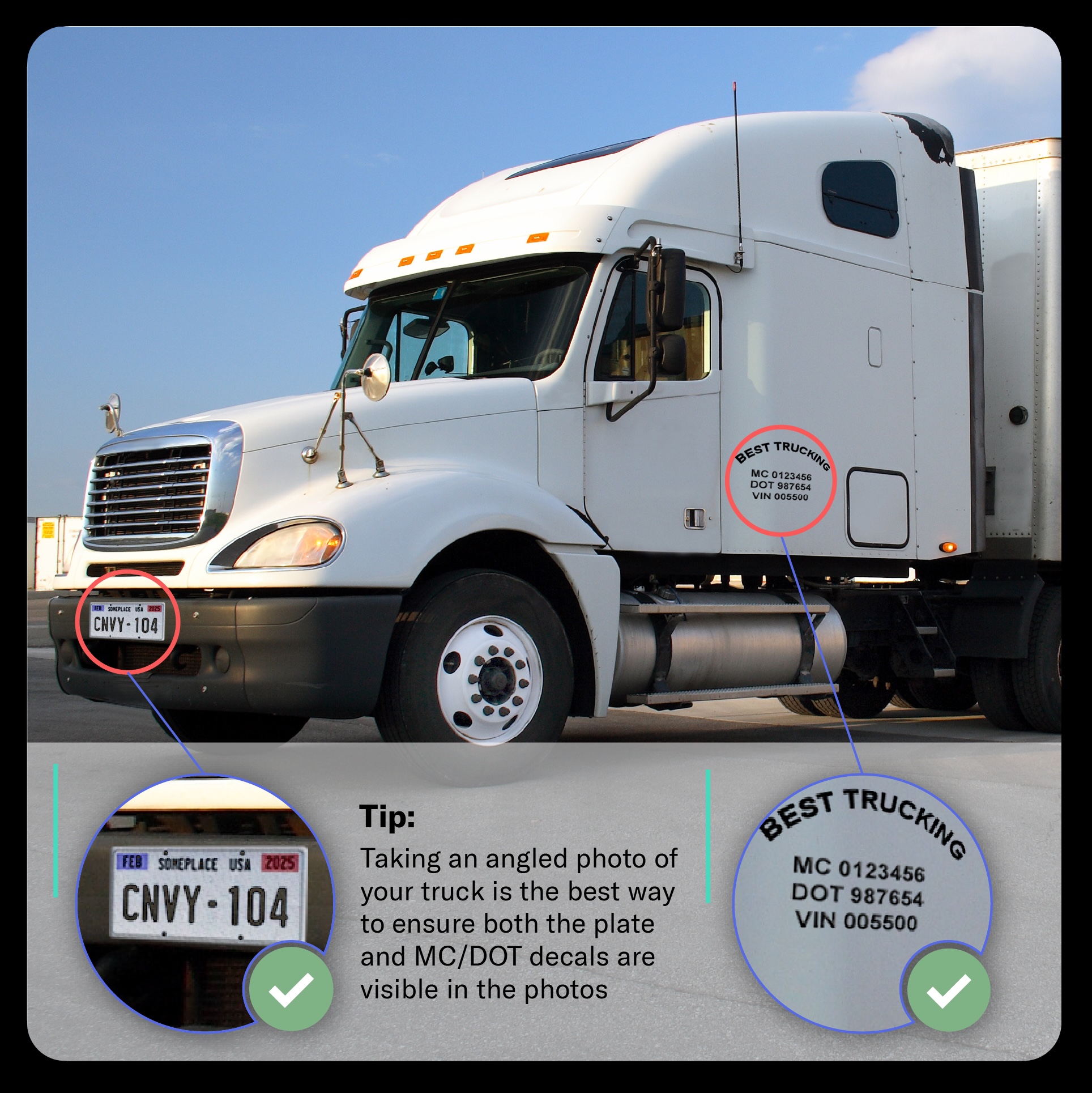
The truck photo is used to match your vehicle to your registration. To be accepted, the photo must clearly show both of the following:
Permanently affixed DOT number and company markings/decals — The MC number or DOT number, and company name displayed on the cab must be legible in the photo.
A mounted license plate — The plate must be visible and the plate number must be legible.
If you have temporary plates, please include a photo of the manufacturer decal located on the driver-side door - this should include the VIN number of the truck
Tip: Taking an angled photo of your truck is the best way to ensure both the plate and MC/DOT decals are visible in a single photo.
Truck Registration / Cab Card
You must upload a current, valid truck registration or cab card. To be accepted, the document must meet all of the following requirements:
Not expired — Expired registrations will not be accepted.
Lists your carrier as the responsible carrier for safety — The carrier name on the registration must match the carrier account being onboarded.
VIN and plate number match the truck photo — The VIN and plate number on the registration must exactly match what is visible in the truck photo you provide.
How to Upload Your Documents
Once your truck photo and registration meet all of the requirements above, you can submit them in the Convoy app or online. This link will take you directly to the documents section: https://cnvy.app.link/equipmentCredentials
To upload through the Convoy app: Open the Convoy app and select Profile in the bottom menu. Then select Equipment & Credentials and upload.
To upload through carrier web: Visit https://carrier.convoy.com/account. Then upload under the “Company Information” tab.
Note: Your account will not be activated until both documents have been reviewed and approved. Make sure both items meet all listed requirements before uploading to avoid delays.
If you have questions about your required documents, please contact carrieraccess@convoy.com
We are missing, or are unable to verify the CDL information entered in the app
In some cases, we may require a verified CDL on the account before we can verify onboarding documents.
If you have not entered CDL information for yourself or a driver, this can easily be done in the app:
Adding CDL for yourself: Under the Profile tab, select Edit Profile > Commercial Driver’s License.
Adding CDL for a driver: Under the Profile tab, select Drivers & Dispatchers > select the driver > then Edit Profile > Commercial Driver’s License.
If you are seeing an alert in the app that reads: Unable to verify identity, please double check and update any incorrect details. A couple tips:
If you have more than one last name, please include all names
Be aware of unintentional spaces in the CDL number, as this can delay verification
More details on adding a CDL to your carrier profile can be found here.
We may require additional verification to approve your application
In the event we are unable to verify important details of your carrier, we may require additional identity verification. If you have not received an email from carrieraccess@convoy.com with next steps, please contact this email for further assistance.